

THE PULSE SURVEY
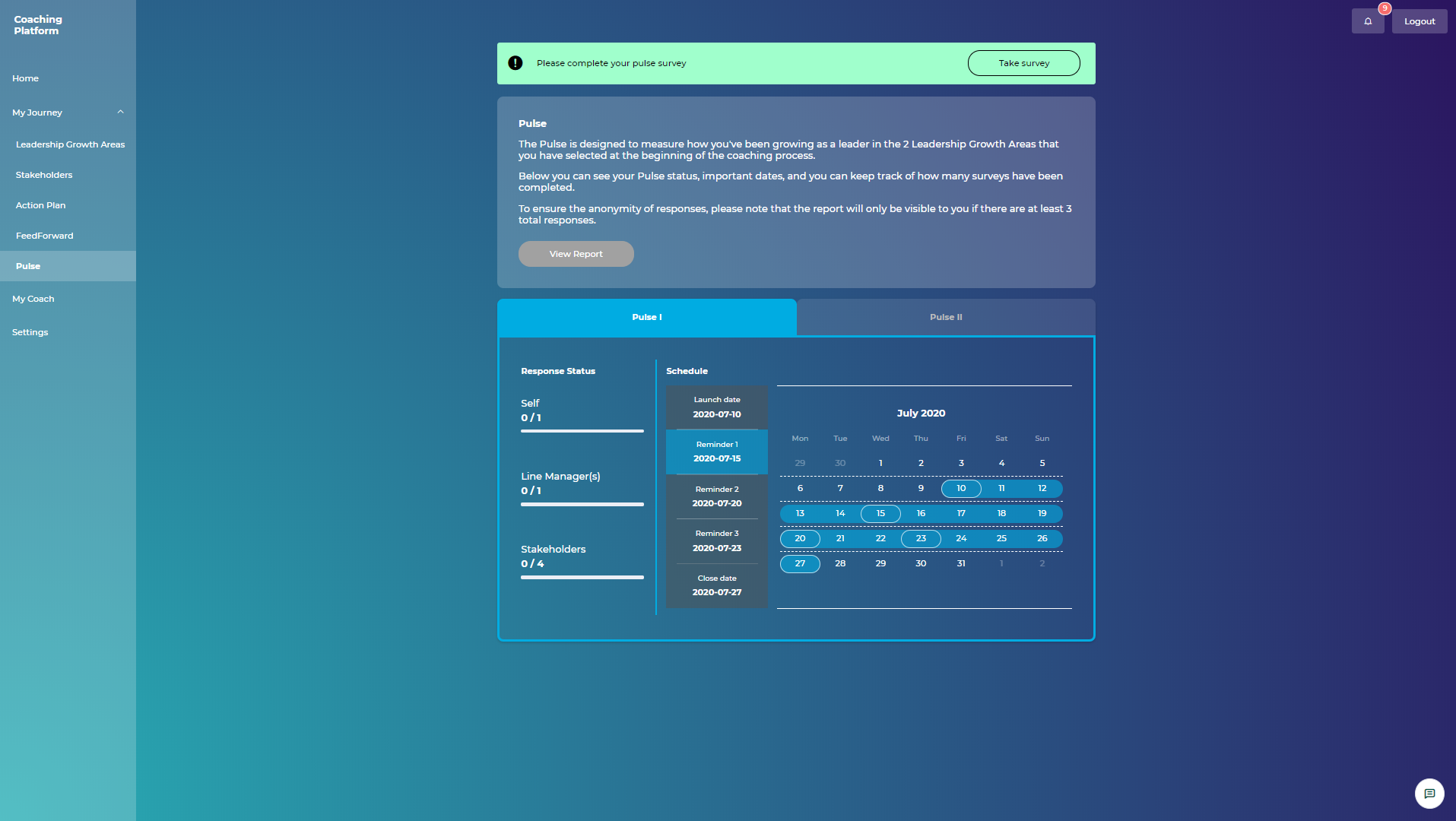
Pulse survey schedule on the Leader dashboard
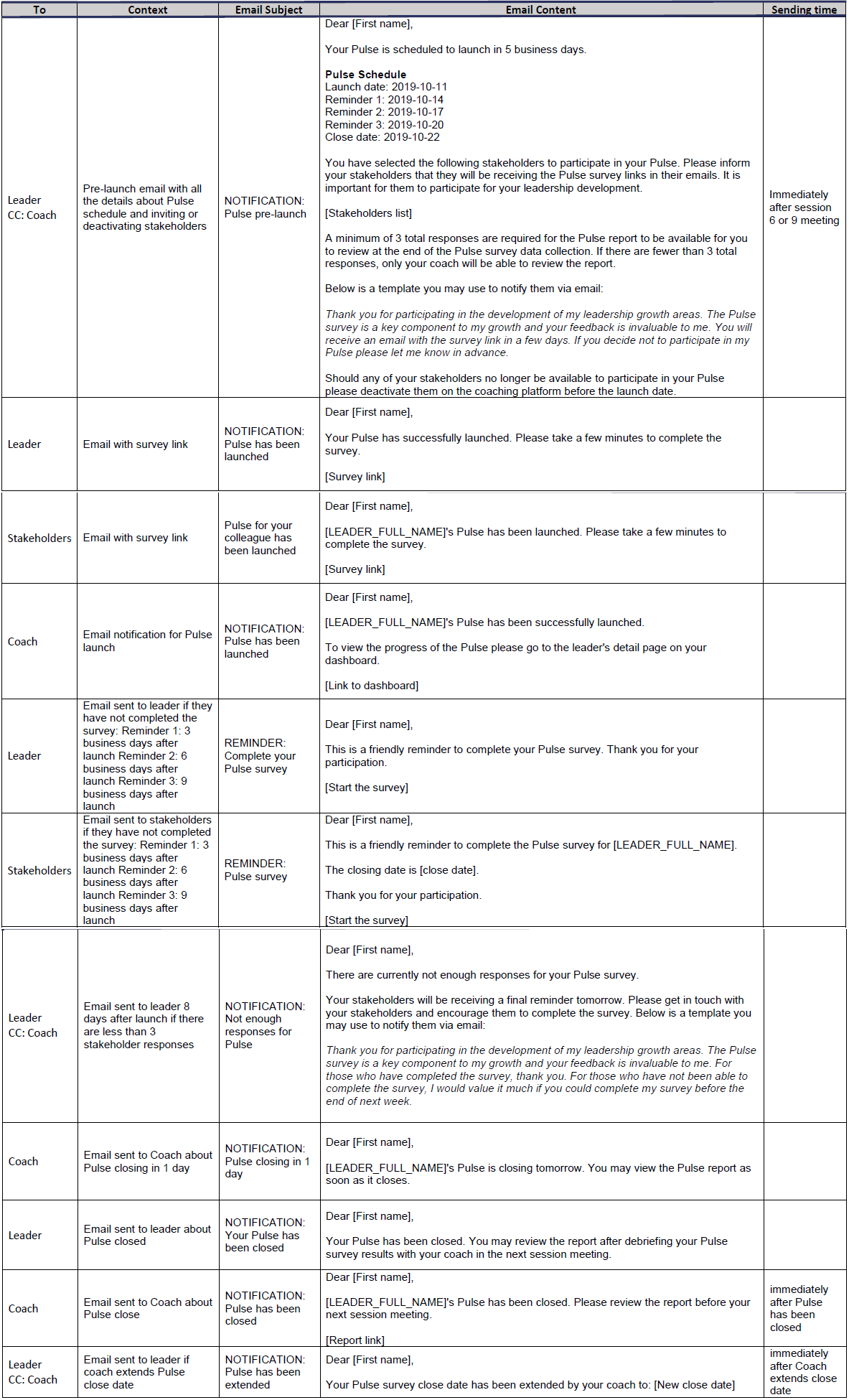
As you might have already learned from the eLearning, 5 business days upon the completion of sessions 6 and 9, the Coaching Platform will send the Pulse survey email to both the leader and the leader’s stakeholders. This email is triggered by the coach completing the session attendance on the Coaching Platform. You will be notified on the pulse schedule via email. Upon launch, you will receive a link to the Coaching Platform where you will have real-time visibility into the status of the data collection.
The details of the Pulse survey emails can be found below:
When is the Pulse survey launched?
The pulse survey gets automatically launched 7 calendar days after the session attendance for sessions 6 and 9 has been completed in the system.
Can I delay the Pulse survey launch?
The pulse survey schedule, including the launch, are set by the system, therefore the survey launch date cannot be changed. The only way to postpone the launch date would be to leave the attendance unmarked and then 7 calendar days upon completion of the attendance the survey will be launched.
My leader has difficulties scheduling session 7 even if I am available. Why is that?
Please note that the minimum required time to book sessions 7 and 10 is 22 business days to allow Pulse to launch and run. This will give enough time to the coworkers and the leader to fill out the survey.
What if one of the coworkers refuses to participate in the Pulse survey?
Should any coworker decide not to participate or if a coworker is unavailable, the leader has the option to 'deactivate' this coworker directly on the coaching platform up until the launch date, which is 5 business days upon the completion of sessions 6 and 9. Once the survey launches, coworker will not be able to opt-out.
Will the coworkers be requested to provide feedforward during the pulse?
As part of the Pulse survey questionnaire, coworkers will be asked to provide feedback and feedforward suggestions for their colleague. Therefore, the monthly feedforward process is halted during that month.
How many survey reminders will be sent?
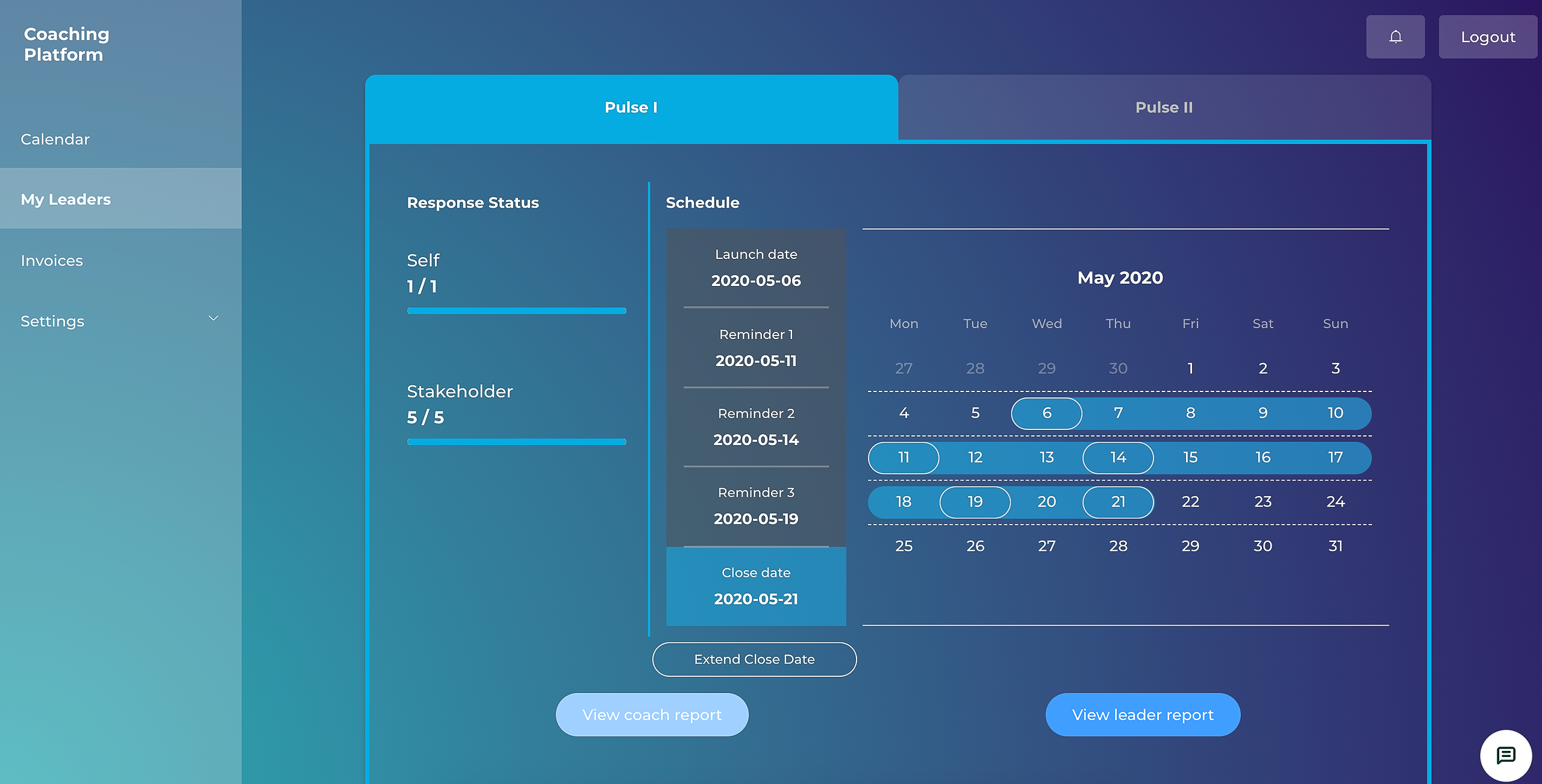
The coaching platform makes reminders simple. Reminder emails are automatically sent to stakeholders and the leader 3, 6, and 9 business days after the launch. The survey closes 11 days after launch.
Can the survey end date be extended?
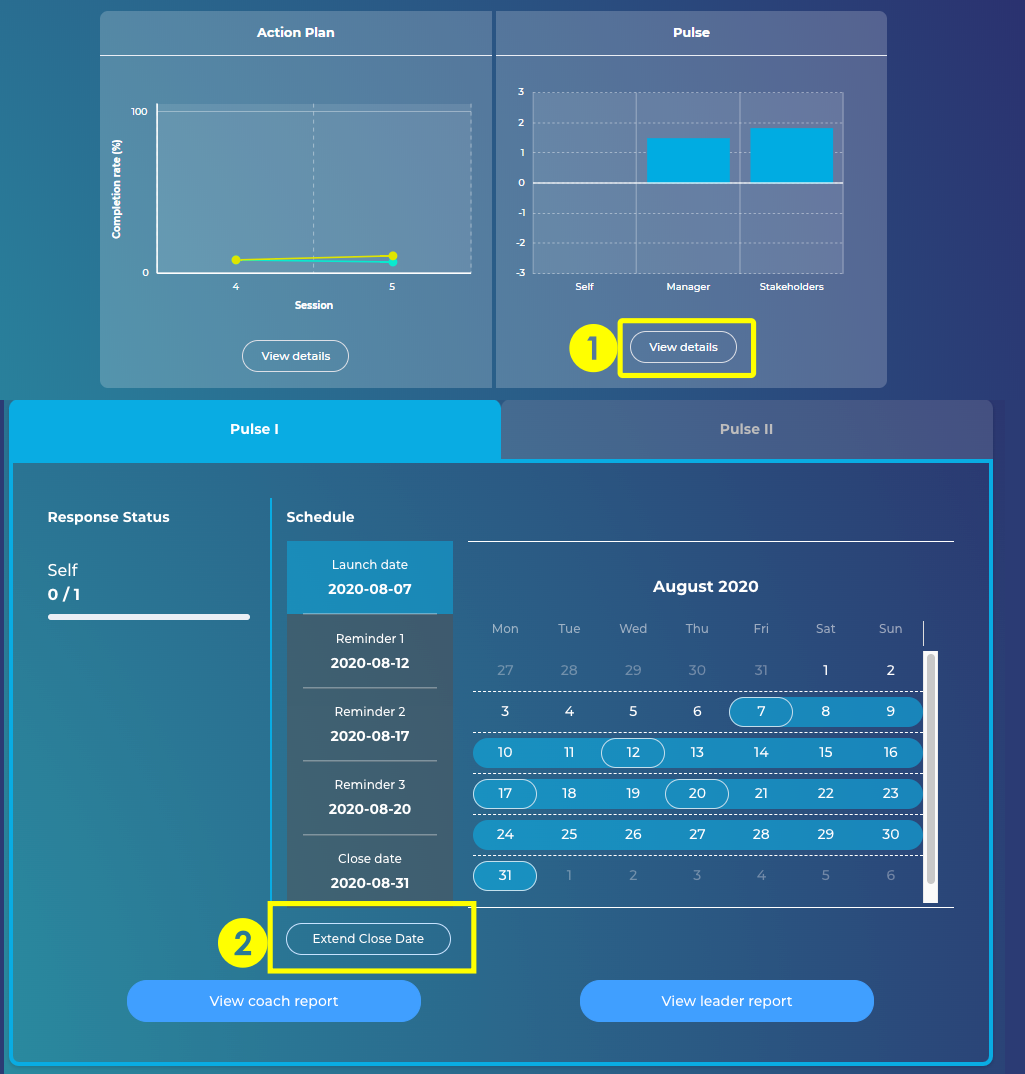
The coach can extend the closing date once, by 5 additional business days. The email with the subject “REMINDER: Pulse closing in 1 day” serves as a reminder giving you the chance to extend the survey before close date.
Go to the Leader’s page
Under Pulse click on View details (1)
Click Extend Close Date button under the survey schedule (2)
Is there a minimum of responses required for the survey to be closed?
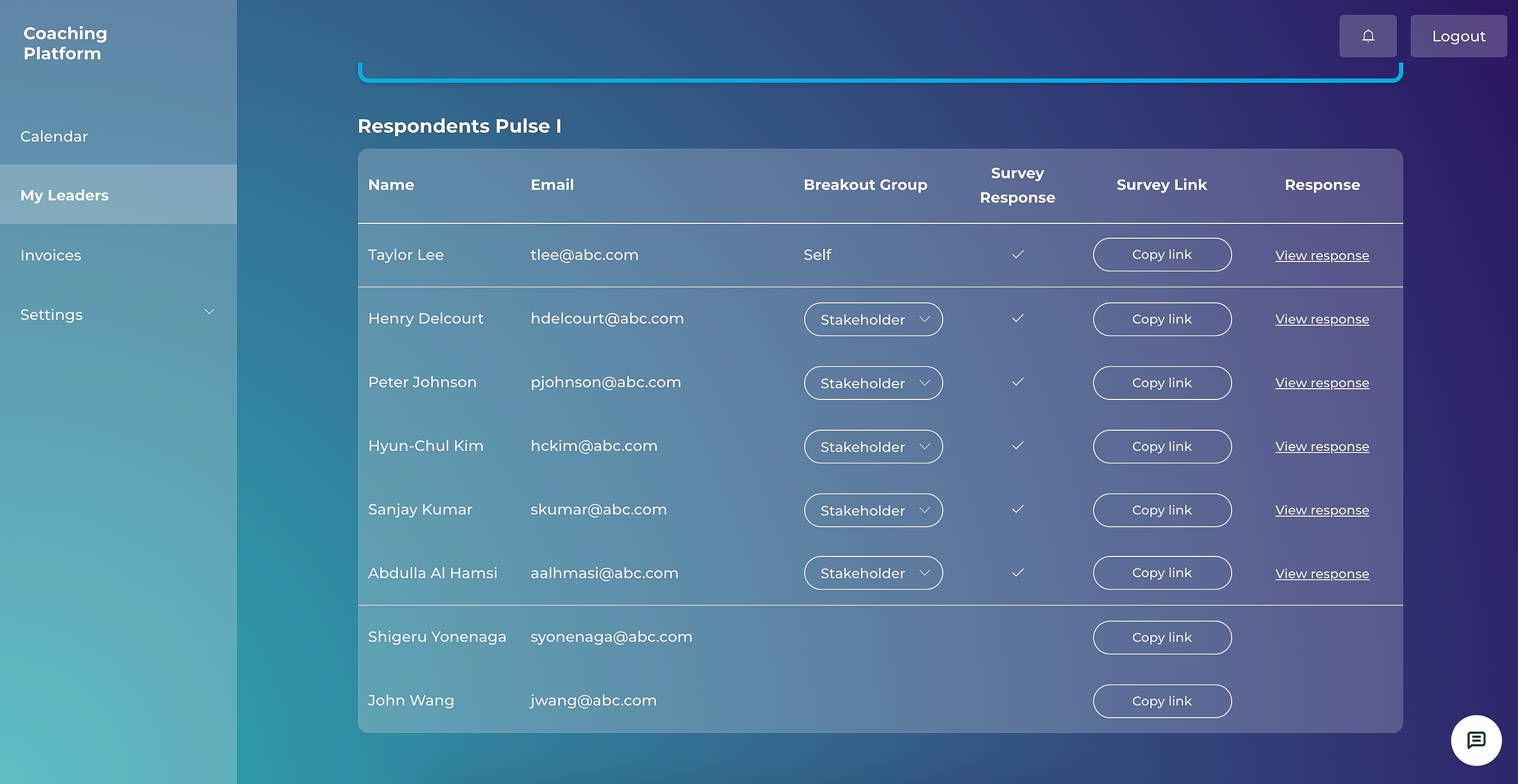
To ensure the anonymity of responses, there must be a minimum of 3 responses collected for the Coworkers breakout group.
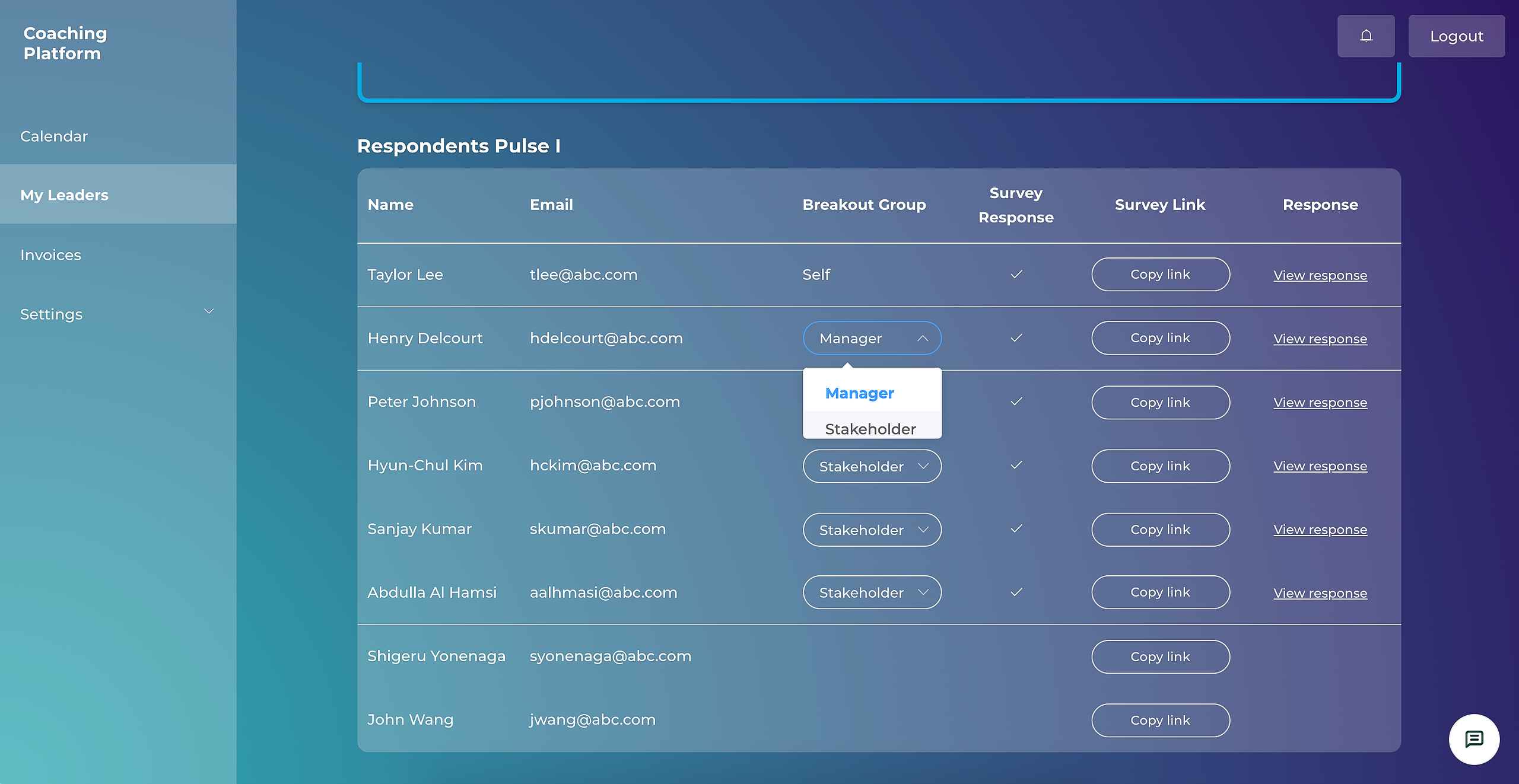
For example: if there is 1 response collected from the Manager breakout group and 2 responses from the Coworkers breakout group, you will be required to move the Manager into the Coworkers breakout group. This will lead to all 3 responses being aggregated into the Coworkers breakout group.
If there are fewer than 3 total responses collected, the leader's view of the Pulse report will not be complete. The responses from the Coworkers breakout group will be hidden. You as the coach, however, will be able to view the entire report.
Can the manager choose to stay anonymous?
The leader’s manager will have the option to have their answer anonymized. In case a manager chooses to have their answers anonymized, they will contact you via email with this request. Accordingly, you will be required to move their answers into the “Coworkers” breakout group. This can be done on the coaching platform:
Will I be able to access the final Pulse report?
The Pulse survey closes 11 business days after the initial launch date. The coaching platform will send you and the leader an email that the data collection has concluded. The Pulse report will be available to be viewed on the coaching platform. The leader will have access to the Pulse report on their account after session 7.
Please note that the Pulse process is explained in detail on the eLearning, under Sessions 5, 6, and 8 - GROW -> SESSION 6 - INTRODUCE PULSE SURVEY -> Pulse Survey - Benefits & Process.
Will I be able to generate and download a PDF version of the Pulse report?
There is no PDF report generated. If you wish to to print the report, you can do so from the browser.
Why can’t the leader access the Pulse survey report before the debrief session?
The coach needs to have the report and prepare for the debrief before sessions 7 and 10. However, the leader should have visibility into the Pulse report after the debrief, as the leader may arrive at different conclusions without the coach’s guidance. It’s the overall guidance provided by the coach that is very relevant in sessions 7. Accordingly, the report will be visible to the leader after the debrief has taken place.